Smart Car Drifting Video
Friday, October 23rd, 2009Who knew you could drift a Smart fortwo?
Who knew you could drift a Smart fortwo?
Below is a link to an interesting article I came across that shows the process of laying out a car wrap design. The article includes the many different steps and also has links on finding vehicle outlines. One of the links is for a download of 6000 free car outlines.
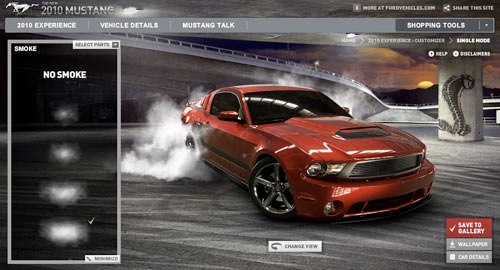
The new 2010 Mustang Customizer is out and it is one of the best configurators I have played with this year.
So what makes this configurator better than the others? First of all it has lots of options. Options for the car, options for the background and also options for different effects you can apply to the car like a burnout, dirt, and smoke.


The other nice thing is that it loads fast. Sometimes when configurators have as many options as this one, it will take forever to load.

The one little thing I think could have been done better is the parts side navigation. I kept having to chase down the “selected parts” link once the box resized itself. It would be great if it stayed the same size or either expanded just from the top down.
It also has nice share options so you show your friends what you created. Here is a link to one of the Mustangs I did. If you go and create one, come back and post it in the comments so I can check it out.
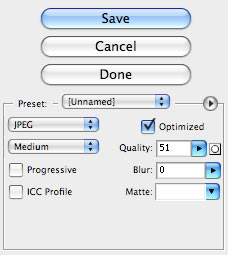
If you are like me and use Photoshop to save images for your website, then you have seen Photoshop’s jpeg quality settings.
The basic idea with these setting is that the higher the setting, the better the image quality and the lower the setting the lower the quality. Along with the image quality is the file size. The higher the setting also means a larger file size and lower the setting means a smaller file size.
The balance is to have the best image quality with the lowest possible file size.
So a common practice, and one I have used over the years, was to go with a middle-of-the-road setting of 50. That way you got good image quality without having a file that was large and made your site load slow.
I recently came across this great article from Sergey Chikuyonok that I wanted to share called “Clever JPEG Optimization Techniques“.
The thing that stood out for me in this article was when Sergey wrote that when you save an image in Photoshop under 50, it uses an additional optimization algorithm, so if you are saving an image that has small, high-contrast details it is better to set the quality setting to at least 51.
In the article, there are some images to show you the difference between that 50 and 51 quality setting. You will be surprised at the difference.
I found another configurator to play with. Want to see all the different options for the new Chevy Camaro? Check out the new Chevy Camaro configurator. It’s easy to use and you can come up with some really cool combinations. (more…)
Imagine trying to decide which color combination on a new Ferrari California will look the best in your driveway. Wouldn’t that be a nice problem to have? (more…)
See the new design I launched for AutomotiveArtists.com this week. This is something I have been working on for the last couple of months.
Not only does the site have a new look with better navigation but it also has new features, which include an image upload for artist’s news stories, enhanced site search, and improved Artists Index. Using Wordpress for this new site allows for user’s comments to be posted.
One of the biggest improvements for me is to be able to make updates daily, depending on Artist’s submission, instead of weekly as done previously. Updates can be subscribed to by email or by RSS feed.
Pages also now have popular share options at the bottom of each page, allowing users the ability to quickly and easily share pages on Digg, Yahoo Buzz, Twitter, MySpace, Facebook, and more.
Below are a few images to show you how the site has evolved over the years. I remember when I started this site; I use to manually do all the updates on pages in plain HTML.
I would have to say about 80% of the work on this new site was moving the content from the old site over into the new one. Now since I have this project completed I can get back to doing my automotive artwork.

Want to get to know somebody? Then start asking them about the cars in their past, present and future.
Eric Miltsch the IT/Web Director for AuctionDirectUSA.com has come up with a great idea for the users of Twitter, it’s called TweetandGreet.com.
He asks 10 easy “mini interview” questions about you and your automotive preferences. It is amazing what 10 simple questions can tell you about yourself and other people.
Being a car guy myself and into automotive art, I was happy to do it. Want to know more about me? Then take a look at my “mini interview“.
If you aren’t using Twitter yet, stop by there to see what the buzz is all about. Afterwards stop by TweetandGreet.com and fill out a “mini interview” yourself. Eric is looking for clever and witty responses, so have fun with it.
Don’t forget to drop back here and post a link to your mini interview so I can find out more about you too!